# How Notra uses Upstash to run an AI content pipeline
Date: 2026-05-28T00:00:00.000Z
**TL;DR:** Notra is an AI tool that turns engineering activity (pushing to a GitHub repo, updating a Linear ticket) into draft blog posts, changelogs and social media updates.
Notra deploys to Vercel, but some of the most important logic (scraping a site, calling an LLM, streaming tokens back to the browser) lasts longer than a single Vercel function could run. So Notra runs all of it on Upstash: Workflow for the long-running jobs, QStash for cron, Redis for shared state, Ratelimit for protection and Realtime for streaming.
## What is Notra?
[Notra](https://github.com/usenotra/notra) is one of the open-source projects we sponsor at [Upstash](https://upstash.com/). It connects to GitHub, Linear and Slack, looks for activity and uses AI to draft changelogs, blog posts and social media posts. The drafts are then put in a dashboard for review.
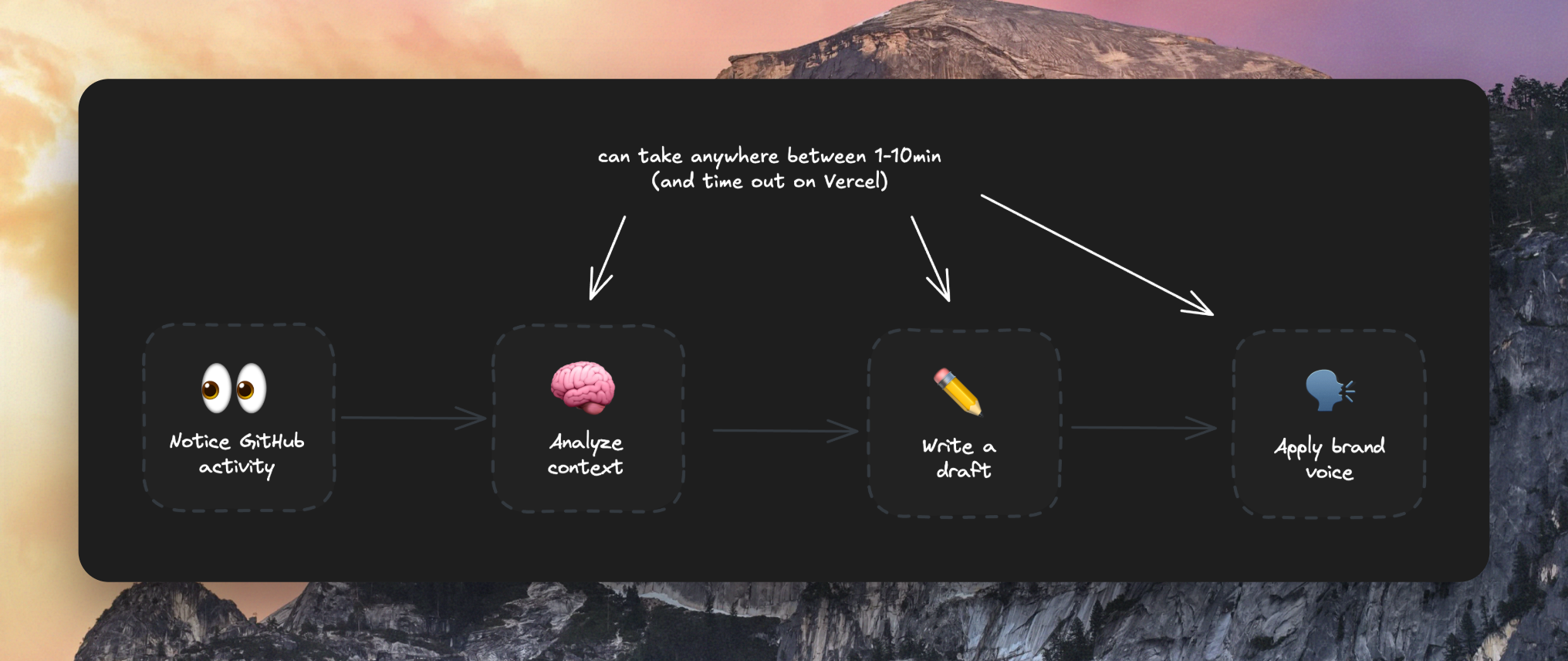
The pipeline has four stages: ingest activity, analyze context, generate a draft and apply a brand voice. None of these are quick HTTP requests.
For example, scraping a marketing site, calling an LLM with a week of GitHub data and generating several drafts can take a few minutes per job. Upstash Workflow runs slow jobs that keep their state and don't time out on Vercel.
Workflow: Notice GitHub activity, analyze context, write draft, apply brand voice.
## Upstash Workflow: no more function timeouts
The [brand analysis workflow](https://github.com/usenotra/notra/blob/66bdd067ddac815e1425b5c239f9baa0914dd17a/apps/dashboard/src/app/api/workflows/brand-analysis/route.ts) is a good example. It runs in three steps:
1. Scrape the user's website with Firecrawl
2. Call Claude Haiku to extract brand info from the scraped content
3. Write the result to Postgres
Each step is wrapped in a `context.run` call, so [Upstash Workflow](https://upstash.com/docs/workflow/getstarted) saves the result of that step before moving on to the next one. If the AI extraction times out, the workflow restarts and skips the steps that already finished.
```typescript
export const { POST } = serve(async (context) => {
const { organizationId, url } = context.requestPayload;
const scrape = await context.run("scrape-website", () => scrapeWebsite(url));
const brand = await context.run("extract-brand-info", () =>
extractBrandInfo({ content: scrape.content })
);
await context.run("save-to-database", () =>
saveBrandSettings(organizationId, brand)
);
});
```
The same pattern handles the rest of Notra's long-running work. Scheduled content runs have more than a dozen steps for fetching integrations, reserving credits, calling the model and sending notifications. Any of them can fail and retry without losing model output.
## QStash: per-user cron schedules
Vercel Cron is one global schedule. Notra needs a schedule per user, such as "every Monday at 9am" or "daily at midnight for user X". The dashboard creates QStash schedules at runtime by calling `client.schedules.create()` whenever a user saves a new content trigger.
```typescript
import { Client } from "@upstash/qstash";
const client = new Client({ token: process.env.QSTASH_TOKEN! });
await client.schedules.create({
destination: `${appUrl}/api/workflows/schedule`,
cron: "0 9 * * 1", // every monday 9am
body: JSON.stringify({ triggerId }),
});
```
When the cron fires, [Upstash QStash](https://upstash.com/docs/qstash/overall/getstarted) POSTs to the schedule workflow with the trigger ID in the body.
## Upstash Redis: shared state for serverless
Serverless functions don't share memory, so Notra uses Redis for everything that has to be visible across requests. That includes job progress for the dashboard's progress bars, a short-lived cache of resolved GitHub and Linear integrations and the chat's stream metadata.
Redis also lets Notra cancel a running chat. The chat workflow runs inside Upstash Workflow, but the LLM call itself runs inside a single Node process with an `AbortController`. There's no easy way for a separate "stop" request to reach into that process and abort it, so the dashboard writes a flag into Redis and the workflow polls for it:
```typescript
import { Redis } from "@upstash/redis";
const redis = Redis.fromEnv();
const abortKey = `chat:abort:${orgId}:${chatId}:${streamId}`;
// dashboard's stop endpoint:
await redis.set(abortKey, "1", { ex: 300 });
// Inside the workflow, polling every 500ms:
setInterval(async () => {
if ((await redis.get(abortKey)) === "1") abortController.abort();
}, 500);
```
The flag expires after 5 minutes, the workflow clears the active stream when it finishes and the response stops within half a second of the user clicking stop.
## Upstash Ratelimit: cheap protection per endpoint
LLM calls can be expensive. Notra wraps every expensive endpoint in `@upstash/ratelimit` with a sliding window. Different endpoints get different limits because they have different costs: brand analysis starts a paid Firecrawl crawl plus a Claude call, so it's limited to 2 per 10 minutes; a post update only hits Postgres, so it gets 60 allowed requests per minute.
```typescript
import { Ratelimit } from "@upstash/ratelimit";
import { Redis } from "@upstash/redis";
const postGeneration = new Ratelimit({
redis: Redis.fromEnv(),
limiter: Ratelimit.slidingWindow(10, "1 m"),
prefix: "ratelimit:post-generation"
});
const { success } = await postGeneration.limit(userId);
if (!success) return new Response("Rate limited", { status: 429 });
```
## Upstash Realtime: streaming AI to the browser
The chat needs to stream LLM tokens to the browser as they are generated. Notra uses Upstash Realtime instead of building a custom SSE layer. The chat workflow opens a channel per message, batches output chunks and emits them; the browser subscribes through an authenticated Next.js route.
```typescript
import { Realtime } from "@upstash/realtime";
import { Redis } from "@upstash/redis";
const realtime = new Realtime({
redis: Redis.fromEnv(),
schema: { ai: { chunk: z.any() as z.ZodType } },
history: { maxLength: 1000, expireAfterSecs: 60 * 60 },
});
const channel = realtime.channel(`chat:${orgId}:${chatId}:${messageId}`);
await channel.emit("ai.chunk", chunk);
```
Upstash Realtime also keeps the last 1,000 chunks for an hour, so if the user's network drops mid-stream the dashboard can reconnect and replay the earlier output.
## Why this stack works for serverless AI
Running AI on serverless brings function timeouts, per-tenant cron, shared state between requests, mid-stream cancellation and streaming output. Each Upstash product above handles one of those, which covers most of the infrastructure work for an AI product on Vercel.
## Find out what AI agents say about you and change it.
Add a few prompts and run a scan to read the answers. Notra is free to start.
[Start for free](https://app.usenotra.com/signup)
[Book a Call](https://www.usenotra.com/contact?ntr=FFzWw-lR0shW-Cai)