> ## Documentation Index
> Fetch the complete documentation index at: https://www.usenotra.com/docs/llms.txt
> Use this file to discover all available pages before exploring further.
# Product map
> What every page in the Notra dashboard does and where it is documented.
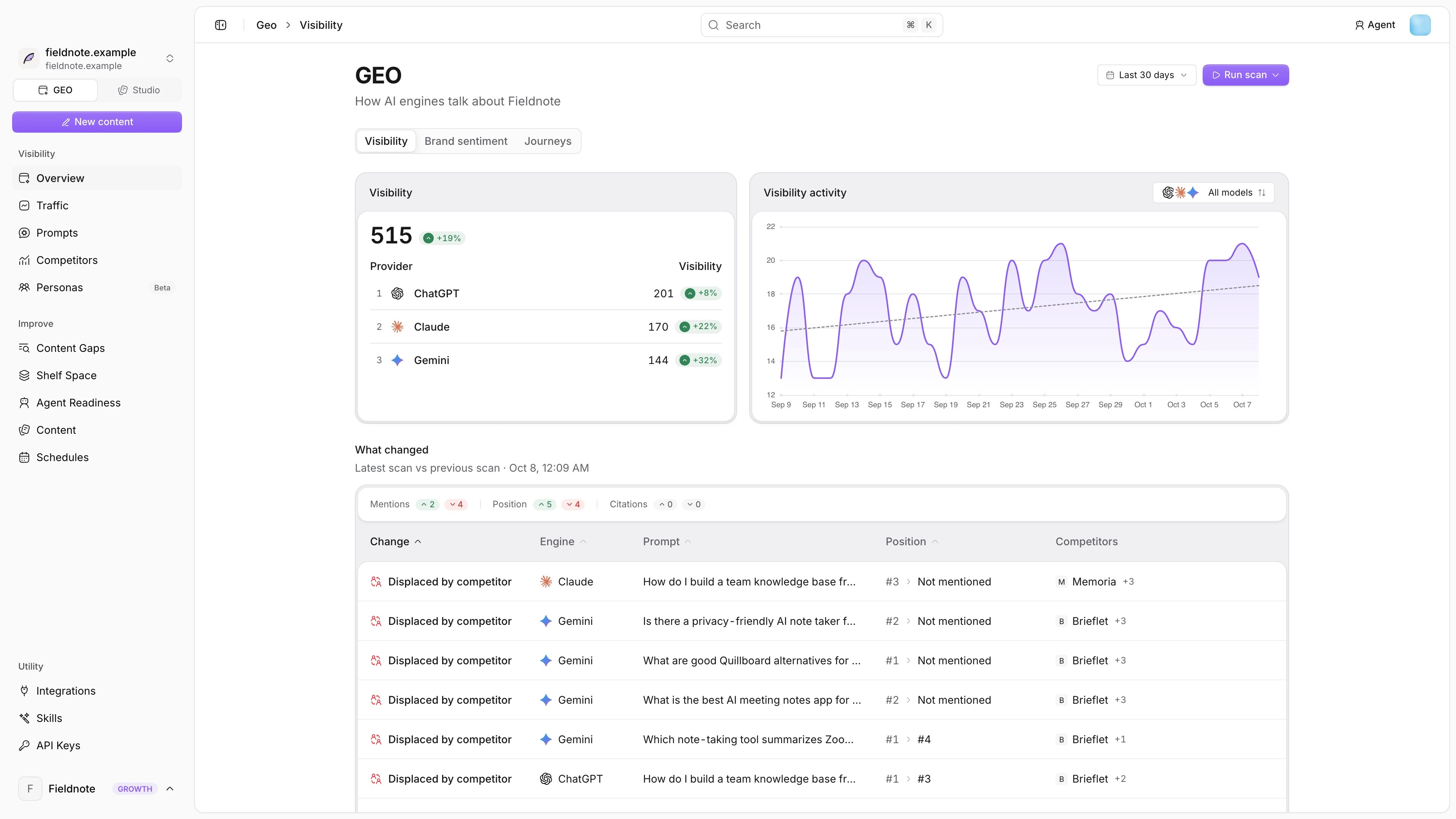
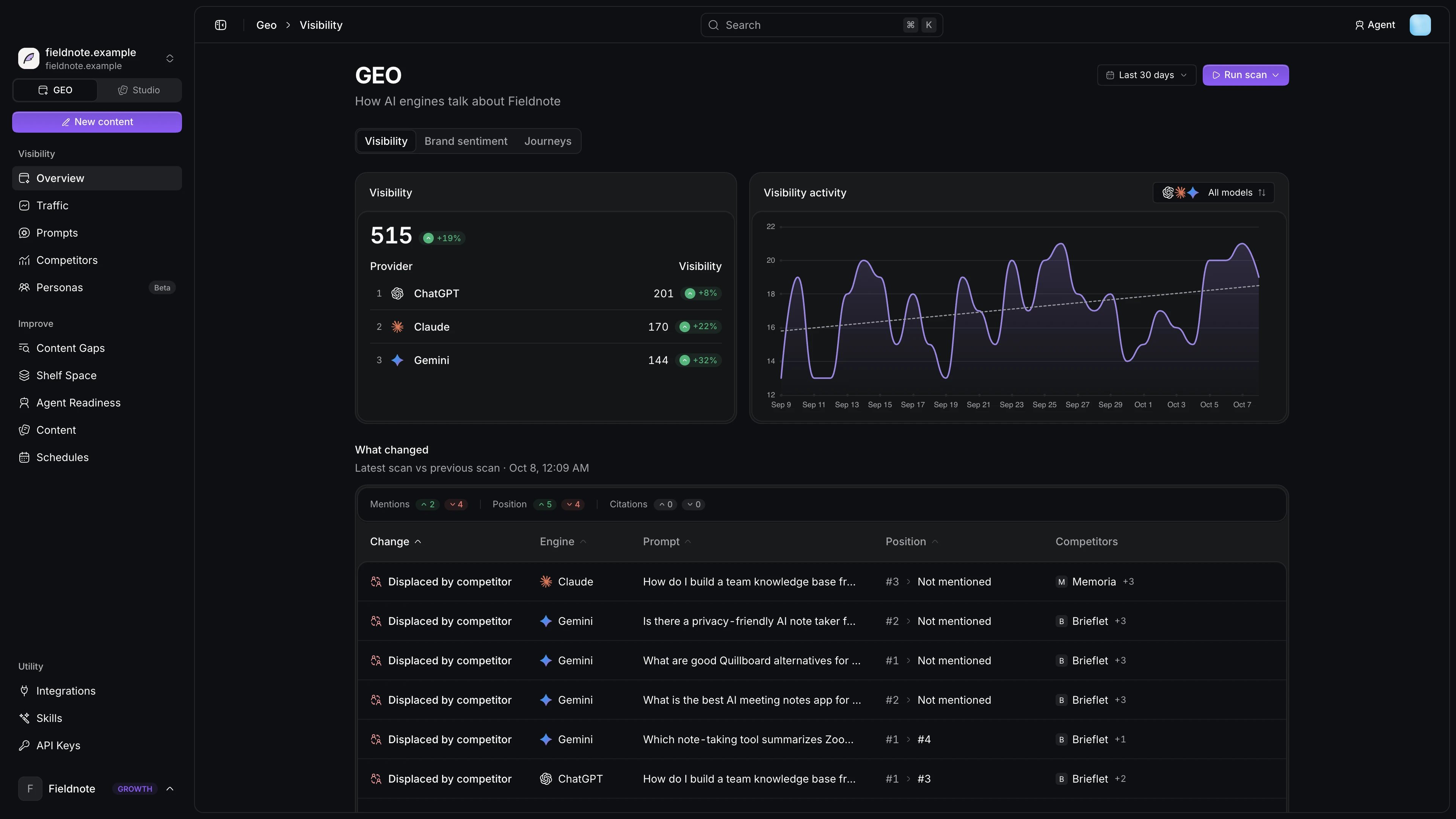
The dashboard sidebar has two modes. **GEO** is the default and the focus of these docs, while **Studio** is the content side. Every GEO page reads the active [project](/docs/geo/projects) from the sidebar.
 ## Visibility
| Page | What it shows | Docs |
| - | - | - |
| Overview | Mention rate, share of voice, What changed, sentiment and agent journeys | [Mention rate](/docs/geo/metrics/mention-rate) |
| Traffic | AI crawlers, AI-cited fetches and AI referrals on your site | [AI traffic](/docs/ai-traffic/overview) |
| Prompts | The questions Notra asks every engine, plus conversations and Search Console suggestions | [Prompts](/docs/geo/prompts) |
| Competitors | Who engines recommend instead of you | [Competitors](/docs/geo/competitors) |
| Personas | Buyer personas that research your category in each engine with web search (beta) | [Personas](/docs/geo/personas) |
## Improve
| Page | What it shows | Docs |
| - | - | - |
| Content Gaps | Questions engines answer without mentioning you | [Content gaps](/docs/geo/content-gaps) |
| Shelf Space | Third-party pages engines cite, and whether you are listed on them | [Shelf space](/docs/geo/shelf-space) |
| Agent Readiness | A score for how well agents can discover and use your site | [Agent readiness](/docs/geo/agent-readiness) |
| Write | Briefs and drafts that answer a gap | [GEO writer](/docs/geo/writer) |
| Content and Schedules | Drafts and recurring generation, shared with Studio | [Content](/docs/content/blog-posts) |
GEO settings (brand, languages and models) open from the settings menu, and the pages for them are [Brand and domains](/docs/geo/brand-and-domains), [Engines](/docs/geo/engines) and [Languages](/docs/geo/languages).
## Studio
Studio turns what you ship into changelogs, blog posts and social posts. It has Content, Chat, Brand Identity, [Social analytics](/docs/studio/social-analytics), [Automation](/docs/automation/overview) and [Integrations](/docs/integrations/overview), plus the agent [Feedback](/docs/feedback/inbox) inbox.
## Learn the metrics
How often engines name you.
Your mentions against competitors.
Where in the answer you appear.
How engines talk about you.
Which pages engines read and cite.
Which gaps to close first.
## Build on Notra
Read visibility and traffic, manage prompts and competitors and trigger scans.
Let Claude, ChatGPT or Cursor work with your GEO data.
This documentation is built and hosted on [Mintlify](https://mintlify.com), a developer documentation platform.
## Visibility
| Page | What it shows | Docs |
| - | - | - |
| Overview | Mention rate, share of voice, What changed, sentiment and agent journeys | [Mention rate](/docs/geo/metrics/mention-rate) |
| Traffic | AI crawlers, AI-cited fetches and AI referrals on your site | [AI traffic](/docs/ai-traffic/overview) |
| Prompts | The questions Notra asks every engine, plus conversations and Search Console suggestions | [Prompts](/docs/geo/prompts) |
| Competitors | Who engines recommend instead of you | [Competitors](/docs/geo/competitors) |
| Personas | Buyer personas that research your category in each engine with web search (beta) | [Personas](/docs/geo/personas) |
## Improve
| Page | What it shows | Docs |
| - | - | - |
| Content Gaps | Questions engines answer without mentioning you | [Content gaps](/docs/geo/content-gaps) |
| Shelf Space | Third-party pages engines cite, and whether you are listed on them | [Shelf space](/docs/geo/shelf-space) |
| Agent Readiness | A score for how well agents can discover and use your site | [Agent readiness](/docs/geo/agent-readiness) |
| Write | Briefs and drafts that answer a gap | [GEO writer](/docs/geo/writer) |
| Content and Schedules | Drafts and recurring generation, shared with Studio | [Content](/docs/content/blog-posts) |
GEO settings (brand, languages and models) open from the settings menu, and the pages for them are [Brand and domains](/docs/geo/brand-and-domains), [Engines](/docs/geo/engines) and [Languages](/docs/geo/languages).
## Studio
Studio turns what you ship into changelogs, blog posts and social posts. It has Content, Chat, Brand Identity, [Social analytics](/docs/studio/social-analytics), [Automation](/docs/automation/overview) and [Integrations](/docs/integrations/overview), plus the agent [Feedback](/docs/feedback/inbox) inbox.
## Learn the metrics
How often engines name you.
Your mentions against competitors.
Where in the answer you appear.
How engines talk about you.
Which pages engines read and cite.
Which gaps to close first.
## Build on Notra
Read visibility and traffic, manage prompts and competitors and trigger scans.
Let Claude, ChatGPT or Cursor work with your GEO data.
This documentation is built and hosted on [Mintlify](https://mintlify.com), a developer documentation platform.