
The Notra Changelog

What we shipped each week, with a look at the biggest change.

Sites for every workspace, one Analytics page and Autopilot workflows

Notra Sites is open to everyone, website and MCP traffic live on one Analytics page, and Autopilot can now build a workflow with you.
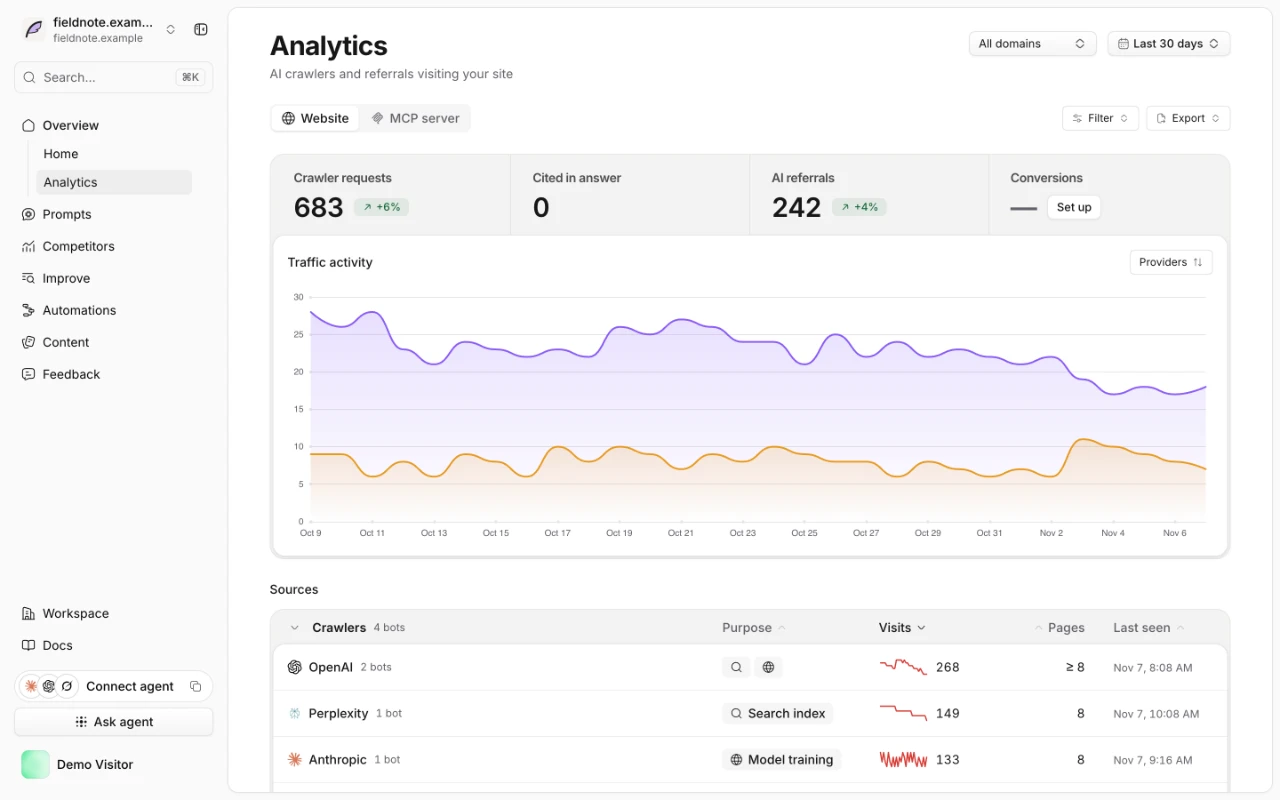
The new Analytics page in Notra, with crawler requests, AI referrals and a 30-day traffic chart for a demo workspace.

One Analytics page

Website traffic and social analytics used to live on separate pages. They're now one Analytics page with three tabs: Website, MCP server and Social.

  • MCP server analytics: see which agents call your MCP server, which tools they use and which server version they run. The same data is in the public API.
  • Clearer setup: AI traffic tracking is now a short list of numbered steps, and the MCP tab shows the same setup card when it has no data yet.

Notra Sites is open to every workspace

Any workspace can now host a blog or changelog from a GitHub repository with Notra Sites. Our own blog moved over this week, and this changelog runs on it too.

  • Agent reach per post: for every post on a Notra site, Content shows how often AI crawlers read it, how often assistants cite it and how many people click through from an AI answer.
  • Domains verify themselves, and a domain that forwards to www is served on the www address.
  • Builds warn about broken links, anchors and missing images before a visitor finds them, including links in the header, footer and shared snippets. notra-sites validate and the dev server show them while you write.
  • Authors: add and edit a site's authors and pick the author page layout in Design → Authors, then credit them in the post editor. Author profiles take YouTube, Threads and Instagram links too.
  • Share images: a new Design → Share images section shows a live preview that matches the published image, and custom fonts now work.
  • IndexNow: after a production deploy, new and changed posts are sent to Bing and other IndexNow search engines, so they show up sooner.
  • Theme updates: when we fix how sites render, live sites rebuild on their own. These builds show as Theme update in Deployments and don't count toward your daily build limit.
  • Design: a redesigned author page, a dither hero style, an editable 404 page and a tile style for blog cards.
  • Faster pages: post images are served as smaller WebP copies, and font files are preloaded with matching fallbacks so text doesn't jump.
  • Redirects accept :placeholders, and integrations are saved as a pull request you can review.
  • Publishing: with one Notra site, Create GitHub PR publishes straight to it, and each finished check names the commit it built.
  • Review changes: the unpublished changes banner opens a review of every draft with its diff, and Discard shows the diffs before anything is thrown away.
  • Phones get an "On this page" menu in every post layout, and compact posts show when they were last edited.
  • Analytics integrations: Capless, Rybbit, OneDollarStats, DataFast and Simple Analytics join the site integrations, each with all of its script options.
  • Robots: the generated robots.txt names xAI's GrokBot next to the other AI crawlers.

Autopilot builds workflows with you

Describe a goal, like "tell me when a competitor overtakes us in AI answers and plan a comeback", and the agent builds the workflow. It asks follow-up questions when something is unclear, and on Autopilot it sits in a dock that opens to a full-screen view with the live workflow.

  • New templates: refresh an old post, write a comparison page, make a page easier for AI to read, and add internal links to pages that rank 4 to 20 in Google. Click a template to see what it does before you add it.
  • Slack: the daily brief is one short message with each pull request or idea in its thread. React 👍 to merge a pull request or 👎 to close it.

Also new

  • GEO settings: turn AI providers on or off and Notra picks the right model for each. GEO settings now fit on two panes.
  • Search Console: queries with buying intent get priority, and for queries you already rank for, Notra suggests updating the page Google ranks instead of writing a new one.
  • Personas run in the language of the prompt, so results in different languages compare fairly.
  • Cover images: a blog post published without one gets a generated cover, also when an automation publishes it or its GitHub pull request is merged.
  • Chat: the home screen suggests prompts based on your workspace.
  • Connect agent: a pill in the sidebar copies a prompt that connects Claude Code, Codex, Cursor or OpenCode to Notra's MCP server.
  • Slack agent: ask about website traffic, like visitors, top pages, sources, countries and devices, next to your GEO questions.
  • Reports: the new State of AI Traffic page shows anonymized AI crawler and assistant traffic across sites that use Notra, updated daily. The November State of AI Search reports are out too.
  • Onboarding: type your website into the homepage hero and onboarding starts with it filled in. Sign-up keeps what your password manager fills in, a taken workspace URL is flagged right under the field, and a status line shows progress while your questions are drafted.
  • Faster dashboard: GEO Overview renders in about half the time, and every page loads less JavaScript before you can use it.
  • Members can leave an organization from Settings → Members.
  • Sites API: read sites and builds, start a build, preview a post, publish it as a pull request and manage authors, with the new sites.read and sites.write scopes.
  • Public API: write a post about one pull request and open it as a draft PR, plus GEO personas, Linear schedule targets and partial schedule updates.
  • GitHub mentions: ask @notra on a pull request to write a blog post about it in a new PR, and it opens a draft PR with the post and its share image. It can also read commit history and other pull requests, so you can ask what changed since a release.
  • Billing: add your company details and tax ID at checkout.
  • GitHub: link an existing GitHub App installation in one click.

Fixes

  • Post to X no longer publishes the same post twice.
  • Posts publish when their GitHub pull request is merged.
  • Updating a post through the API keeps its video embeds.
  • Linear schedules turn off when their integration is removed.
  • GitHub org members who aren't owners can request the Notra app, and Notra shows that it's waiting for an owner's approval instead of an error.
  • In monorepos, Autopilot writes blog posts to the folder your GitHub integration publishes to instead of the repository root.
  • Asking @Notra about Autopilot in an Autopilot Slack thread gets an answer about Autopilot.
  • The whole post card on a Notra site is clickable, and site pages no longer shift while loading.
  • A Notra blog without posts shows visitors a "No posts yet" page with an RSS link instead of a setup hint meant for the owner.

MCP integrations, blog redesign, and content wizard

MCP server integrations with encrypted headers, redesigned integrations and blog pages, server-side code highlighting, a refreshed Create Content flow, Image content generation, landing page updates, security fixes, and UX improvements.

This week shipped some key pieces for your development workflow. MCP server integrations now let you connect custom tools with encrypted headers and runtime loading. The Integrations page got a full redesign with category tabs and MCP promoted to a first-class integration. We redesigned the blog with author profile pages and dynamic per-post OG images. Code blocks now highlight on the server side and have copy buttons. The Create Content flow is now a three-step wizard (Formats, Activity, Brand Identity), and the landing page got a refresh with a 3D mega menu and gradients across all pages. We also added an Image content type so you can generate brand-matched repository images from chat or schedules. Several security fixes and UX improvements round out the week.

Highlights

MCP Server Integrations with encrypted headers and runtime tool loading

Organization-scoped MCP servers with encrypted header storage, connection testing from the dashboard, and runtime tool loading for chat and standalone agents. Tools show in chat with dynamic blocks and server favicons. (#369)

Integrations page redesigned with category filters and MCP promotion

New top-level tabs (All, Input, Output, Extensions) replace section-based organization. MCP is now a first-class integration card linking to a dedicated /integrations/mcp page. Added unified "Connect" buttons with hotkey across GitHub, Linear, and MCP. (#370)

Blog author pages and dynamic OpenGraph images

Added /blog/author/[slug] profile pages with role and social links. Each blog post now gets a dynamic OG image with the title, author avatar, and role. Both posts and author pages use true ISR for fast incremental updates. (#367)

Blog code highlighting with server-side rendering and copy buttons

Code blocks highlight server-side with Shiki using dual light/dark themes. A copy button appears on hover and copies the snippet to clipboard with a toast confirmation. (#366)

Landing page redesign with mega menu and smooth animations

Reusable SiteShell component brings the hero gradient to every page. The navbar mega menu uses a dub-style 3D scale-in effect, and caret color inherits the trigger text. Offscreen sections use content-visibility for performance. (#364)

More Updates

Features & Enhancements

  • Create Content as 3-step wizard (#348) - Formats, Activity, and Brand Identity steps. Multi-format and multi-identity generation fans out as parallel requests. Commit previews now show GitHub login when available.
  • Create Schedule as dialog (#349) - Daily/Weekly/Monthly tabs, time picker, day-of-week/day-of-month selectors, and a live summary card with next run and local timezone. Auto-publish hidden and forced off for LinkedIn/Tweet.
  • Image content type (#375) - Generate brand-matched repository images through content creation and chat. Supports revisions from chat with sandbox snapshots and records usage for billing.
  • Figma and Paper export for image content (#377) - Copy buttons on image detail pages for exporting to design tools via Kiwi clipboard helpers.
  • Author profile pages for blog posts (#367) - Profiles at /blog/author/[slug] with avatar, role, and icon-only social links (brand icons with globe fallback for unknown platforms).
  • True ISR for blog and author pages (#367) - Both now prerender at build and regenerate on a timer instead of serving dynamically.
  • Chat media uploads (#306) - Attach images and documents to conversations. Scoped to org with org membership checks and R2 persistence.
  • Chat post persistence (#328) - Save, edit, regenerate, and publish posts directly from chat previews with draft tracking.
  • Structured onboarding flow (#310) - Three-step wizard: workspace setup, social connection (X/Twitter), then pricing. Deferred brand analysis dispatch.
  • X thread builder free tool - No signup required. Draft, reorder, and personalize threads with drag-and-drop and per-post char counter. Linked from footer Free Tools.
  • Knip static analysis (#330) - Caught unused exports and dead files across web, dashboard, and API. Integrated into CI.
  • Chat model picker with search - Popover combobox with searchable models. Added Kimi K2.6 and GPT-5.5 support.
  • CLI auth handshake - New /dashboard page and API routes (POST /api/cli/sessions/[sessionId]/authorize, GET /api/cli/sessions/[sessionId]) for Notra CLI authorization. Mints scoped Unkey API keys.

Performance & Infrastructure

  • AI Gateway Auto-Caching - Enabled automatic caching for improved response times on content generation.
  • TanStack Form + Zod for dialogs (#350) - Migrated schedule and content dialogs to form framework. Deferred validation runs only on submit; buttons stay enabled until clicked.
  • Chat backend extracted to @notra/ai package (#318, #319) - Chat history, schemas, types, metadata helpers, and abort polling now reusable across apps/api and apps/dashboard via configureChat({ redis }).
  • Shared content generation infrastructure (#321) - Consolidated language rules, brand identity, factuality, tool guidance, and humanizer blocks. Reduces prompt duplication across changelog, blog-post, and linkedin builders.
  • Refactored chat tool helpers to Zod schemas (#371) - Stronger typing for tool requests and approvals.
  • Repo image generation improvements - XML-based agent prompt following Claude best practices. Recovery pass when output.html is missing.
  • Repo image via content workflow (#375) - Removed standalone /[slug]/repo-image page. Image generation now flows through content UI and chat.
  • Event trigger creation as dialog (#351) - ResponsiveDialog matching schedule/content chrome. EventTypeCard for release vs push, GitHub-only repos, and brand voice controls.
  • CLI sessions with 5-minute expiry (#316) - One-shot poll via plaintext Verifications table for temporary API key handoff.

Security & Bug Fixes

  • Reject executable skill frontmatter (#373) - Skill files with language markers like ---js are now rejected. Parser enforces plain YAML only via gray-matter with explicit language setting.
  • Linear webhook payload validation (#335) - Zod schema enforces valid structure before processing; invalid payloads logged and rejected.
  • Realtime channel authorization per-org (#325) - Multi-tenant leak fixed. ACL now enforces exact channel shape, rejects wildcards, and requires org membership for all subscribed channels.
  • Linear OAuth state validation per-org (#327) - Validateion on authorize and callback. Session userId must match oauthState userId; org membership checked both times. State deleted only after auth passes.
  • SSRF protection for IPv4-mapped IPv6 (#326) - Hardened URL validation. Detects ::ffff: IPv4-mapped and ::/96 IPv4-compatible addresses and checks them against reserved ranges.
  • Skill frontmatter validation - Empty frontmatter and missing name/description now rejected. Partial unique constraint on (name, organization_id, is_system).
  • Fixed null-state crash in trigger editor (#315) - Prevents crashes when triggers are partially configured.
  • Validate Linear webhook structure - Reject malformed payloads before routing to handlers.
  • Prevent concurrent chat delete race - Deleted chats no longer accept appended messages; upsert checks deleted_at IS NULL.
  • Guard GitHub integration token rotation (#315) - Repository rename now editable; validates new owner/repo pair against GitHub and rejects duplicates.

Internal Changes

  • Notification settings restructured (#335) - Config-driven toggle components, owner recipient summary, loading skeletons.
  • Onboarding website field optional (#331) - Brand analysis skipped unless a website is provided.
  • Chat availability expanded - Removed ai-chat-experiment flag; chat now available to everyone.
  • Humanizer skill content inlined (#301) - Seeding no longer depends on reading files at runtime.
  • Unsaved changes toast lifecycle fix (#301) - Toast dismisses only when hasChanges flips to false.
  • Brand identity favicon in chat tool blocks (#307) - Dynamic tool icons show brand favicon when available.
  • Modal dialog unification - Consistent chrome for schedule, content, and event creation with matching ResponsiveDialog, footer status, and validation patterns.
  • TCC tracing for AI SDK runs (#324) - Added observability for agent execution.
  • Offline-first Databuddy analytics - Masking slugs and skipping reserved routes in telemetry.
  • Better-auth integration improvements - Session context from request headers; organization context resolved for redirects.

Documentation

  • Switched docs to Luma - Restructured with Guides, API Reference, and Devtools sections. Simplified navigation and clearer information hierarchy.
  • Added quickstart guide - Step-by-step setup walkthrough for new users.
  • Merged mintlify content - Integrated concepts, automation, content types, organization, webhooks, and API reference pages.
  • llms.txt discovery - Advertises /llms.txt and /llms-full.txt on every page for AI agent discoverability.
  • RSS 2.0 feed for blog - Auto-discovery via Atom link tag in page head.
  • Removed em dashes from docs - Replaced with standard punctuation throughout all documentation files.

Integration API, Billing, and Analytics

Integration deletion via API, billing trials with credit top-ups, customer portal access, and analytics tracking for generation modes.

This week brought three major additions to Notra: the ability to delete integrations via API, a restructured billing model with trial periods and credit top-ups, and better analytics tracking for content generation workflows. Development teams can now manage their GitHub and Linear connections programmatically, while teams exploring Notra have access to a 14-day trial on the new Basic plan. Analytics improvements let us track whether content is being generated automatically or manually, helping teams understand their usage patterns.

Highlights

Programmatic integration deletion

You can now delete GitHub or Linear integrations directly via API with a new DELETE /integrations/{integrationId} endpoint that automatically disables and unschedules any related automation triggers.

Billing restructure with trial periods and credit top-ups

The free plan is now Basic, available as a 14-day trial with options to purchase additional AI credits in preset amounts. This gives new teams time to evaluate Notra before committing to a paid plan.

Customer portal access for subscription management

Users can now manage their active subscriptions directly from the billing page without leaving Notra, improving the self-service experience for teams on paid plans.

Analytics tracking for content generation modes

We now distinguish between automatic (scheduled or event-driven) and manual content generation in our analytics, helping you understand which workflows your team relies on most.

More Updates

Features & Enhancements

  • Add customer portal button to billing page #224 - Allows subscription management without leaving the app.

Infrastructure

  • Disable routine Dependabot updates - Reduces noise in the repository while keeping security updates on schedule.

Async API, write-scoped keys, Framer integration

Async content generation APIs, write-scoped keys, Framer integration, and API security improvements shipped this week.

Over the past week, we shipped async API endpoints for content generation, write-scoped API keys with granular permissions, and security improvements. Developers can now trigger content generation in the background, poll job status, and integrate generation directly into their workflows. This enables scheduled content jobs, batch operations, and automation pipelines. We also added Framer integration with an interactive four-step setup, improved brand voice consistency across all generated content types, and added API security headers to protect against common vulnerabilities. You can now connect public GitHub repositories without requiring personal access tokens, edit your own API tokens from settings, and manage access permissions at a granular level.

Highlights

Async API content generation with job polling

Trigger content generation asynchronously and check job status in your own workflows. Enables scheduled content, batch operations, and seamless integration into automation tooling.

Write-scoped API keys and post deletion

Create read-only or read-write API keys with granular permissions. The new DELETE endpoint lets you remove posts programmatically.

Framer integration

Connect Notra to Framer projects with an interactive setup guide. Generate content right from your Framer workspace in four steps.

Brand voice consistency across content types

Your brand voice is now enforced across all generated content, from changelogs to blog posts to social updates.

API security headers

Added HTTP security headers to protect API responses against common web vulnerabilities.

More Updates

Features & Enhancements

  • Connect public GitHub repos without a token - Use any public repository without needing personal access tokens.
  • Searchable brand voice selector - Replaced the dropdown with a searchable combobox for faster lookup when managing multiple voices.
  • Edit your own API tokens - Rotate or update authentication tokens directly from settings.

Infrastructure

  • Extract AI logic into shared packages/ai #207 - Refactored all AI agents, prompts, tools, and utilities into a dedicated module for code reuse across dashboard and API.
  • Autumn SDK v2 migration - Upgraded to Autumn v2 for improved compatibility with the latest SDK features.

On-Demand Content Generation with Fine-Grained Control

On-demand generation, selective source filtering, Twitter OAuth brand voice imports, and instant publish for scheduled triggers.

This week shipped features that give teams much better control over content generation. You can now generate changelogs, blog posts, and tweets on-demand while picking exactly which commits, PRs, and releases to include. Brand voice imports pull directly from your X accounts via OAuth, and there's a new blog generator for longer-form storytelling across four tones. Triggers can auto-publish instead of always creating drafts, saving manual review work. We also made generation progress visible with skeleton cards, added a fail tool so agents tell you why they can't generate, and improved error logging throughout the dashboard.

Highlights

On-demand content with selective source filtering

Generate changelogs, blog posts, and tweets on-demand. Choose which commits, PRs, and releases to include, and set a custom lookback window per generation.

Multi-source brand voice import via Twitter OAuth

Import tweet examples directly from connected X accounts, with pinned tweets prioritized first. Add custom text references alongside imports.

Blog post generator with narrative tones

New output type for long-form storytelling. Choose from casual, conversational, professional, or formal tones, separate from changelog format.

Instant publish toggle for triggers

Schedules can now auto-publish generated content instead of always creating drafts, cutting manual review for teams running frequent generations.

Multiple social posts per generation

Twitter and LinkedIn agents create multiple distinct drafts from a single run when the data warrants it. Workflow notifications list all created posts.

More Updates

Features & Enhancements

  • Support multiple social posts per generation #198 - Twitter and LinkedIn agents can create multiple drafts from a single run with updated workflow notifications.
  • Add instant publish toggle for triggers #205 - Enable auto-publish on schedules and event triggers for immediate post creation with "published" status.
  • Warn about affected triggers when deleting brand voice #197 - Prevent orphaned schedules by disabling triggers that reference a deleted voice, with a preview shown before deletion.
  • Add connected accounts section to settings #194 - View and manage connected X/Twitter accounts directly in organization settings with one-click disconnect.
  • Track active content generations with skeleton cards #196 - See real-time progress for running generators on dashboard and content pages via skeleton placeholders and toast notifications.

Developer Experience

  • Add fail tool for AI agents #195 - Agents gracefully fail with a reason shown in logs and emails when no data is available.
  • Improve logs UI and add error visibility #195 - Error messages display under log entry titles, actions column added with reference ID copy, integration type labeling fixed.
  • Add getBrandReferences tool to all AI agents #188 - All agents call the brand voice API first to match your writing style before generating.

Bug Fixes

  • Fix webhook logging for on-demand content - On-demand content now appears in Logs page after creation.
  • Split missing header vs unsupported event type in webhook handler - Clearer error logging helps distinguish config issues from actual unsupported events.
  • Fix API content routes with org-scoped keys #204 - API routes properly align with org-scoped API keys.

Infrastructure

  • Use Bun in Docker image #203 - Docker builds now use Bun for faster startup times.
  • Expose environment port for deployment #203 - Server reads port from process.env for cloud deployments.
  • Changelog and Showcase refactor #199 - Marketing site displays product changelog using Notra's own SDK with timeline view and detail pages.
Report abuse