
On this page6 sections
When Notra Autopilot opens a pull request with a draft post, you can now edit it without leaving Notra. Open the pull request's Autopilot page and the post it writes is right there. Type what you'd change in plain words. Autopilot commits the edit to the pull request branch and shows it to you as an inline word diff, next to the agent's reply. Once the post reads the way you want, merge the pull request like any other.
Why edit the post on the Autopilot page?
You can read the post next to the request that changes it. Before this, reviewing an Autopilot draft meant opening the pull request on GitHub and reading raw Markdown in the files tab. That works for the people who live in GitHub. It's slower for whoever owns the words, because you're reviewing a file diff instead of a post.
The Autopilot page now loads the post from the pull request and puts a chat-style editor beside it. You ask, the agent edits, and the diff shows exactly which words changed. You don't have to hunt for them in a full rewrite.
How to request a change
- Open Autopilot and click the pull request you want to review. Its page shows the post the pull request writes.
- Describe the change in plain words, like "shorten the intro", "lead with the API change" or "drop the pricing paragraph".
- Wait for the reply. Autopilot commits the edit to the pull request branch, and the page shows the changed words inline along with the agent's reply.
- Keep going until it's right, then merge the pull request on GitHub.
Each request is its own commit, so the branch history matches the list of changes you asked for.
What happens behind the page
Your request doesn't go through a separate editing system. The page posts it as a marked comment on the pull request, which starts the same workflow that runs when someone tags @notra in the thread. That workflow hands Autopilot branches to the regular Notra agent. The agent commits the edit, and the Autopilot page moves to that new commit, so what you see on the page is what's on the branch.
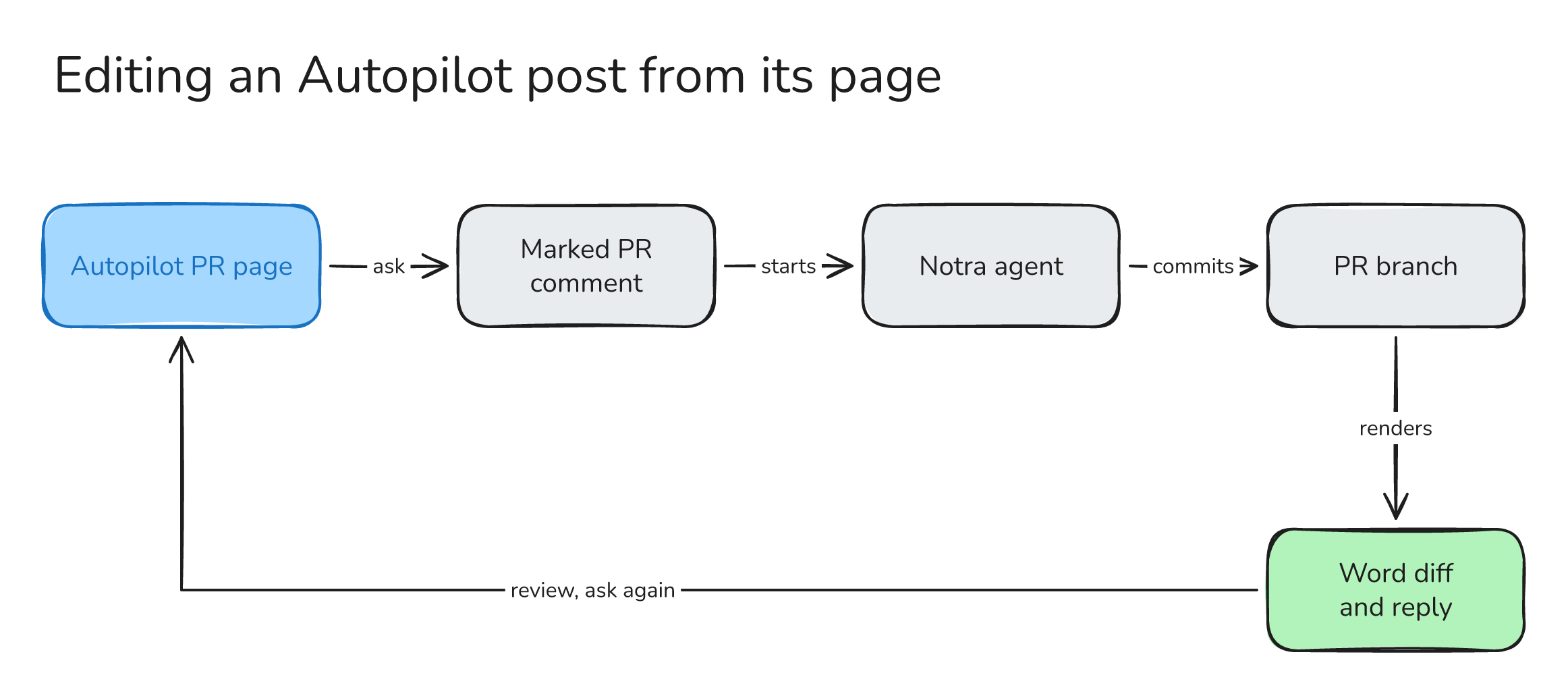
In practice, this means your teammates on GitHub see every request you made from Notra as a comment on the pull request. Nobody has to wonder why the branch changed.
Which way of editing should you use?
You now have three ways to change an Autopilot post. They suit different reviewers.
| Option | How edits land | Best for |
|---|---|---|
| Autopilot page | Committed to the branch on each request, shown as a word diff | Whoever owns the wording and wants to read the post, not the file |
@notra in the GitHub thread |
Wording feedback comes back as a suggestion you commit with one click. Clear fixes are committed when you say so | Engineers already reviewing in GitHub, or line-by-line comments |
| Editing the Markdown yourself | You write and commit the change | Small fixes you can type faster than you can describe |
Our recommendation is to use the Autopilot page by default if you're the one signing off on the content. Switch to a GitHub review comment when you want to approve a wording change before it touches the branch. The page commits every edit straight away, and a GitHub suggestion stays off the branch until you click Commit suggestion.
Mistakes to avoid
- Bundling many changes into one request. One request becomes one commit and one diff. Ask for several things at once and the diff gets harder to check.
- Merging before the last reply arrives. The page follows the branch's latest commit. If you merge while an edit is still running, you can merge the version before it.
- Treating the page as a preview of your site. It shows the post the pull request writes. Your site's layout and styles still only show up wherever you normally preview the merged content.
FAQ
Can I undo an edit Autopilot made from the page?
Yes. Each request is a separate commit on the pull request branch, so you can revert that commit the way you'd revert any other. You can also ask Autopilot in plain words to put the earlier wording back.
Will the agent touch code in the pull request?
The page sends requests through the same agent that handles @notra mentions. That agent only edits content (Markdown, MDX, text and the data files next to them) and never commits to your default branch.
Do page requests use credits?
A request from the page starts the same workflow as an @notra mention on the pull request. Mentions use your plan's pull request credits first, then your AI credits.
Can I mix page requests and GitHub comments on the same pull request?
Yes. Requests from the page show up as comments in the pull request thread, and every edit lands on the same branch. You and a teammate can work on one post from both places, though you'll read it more easily if you wait for one edit to finish before asking for the next.